
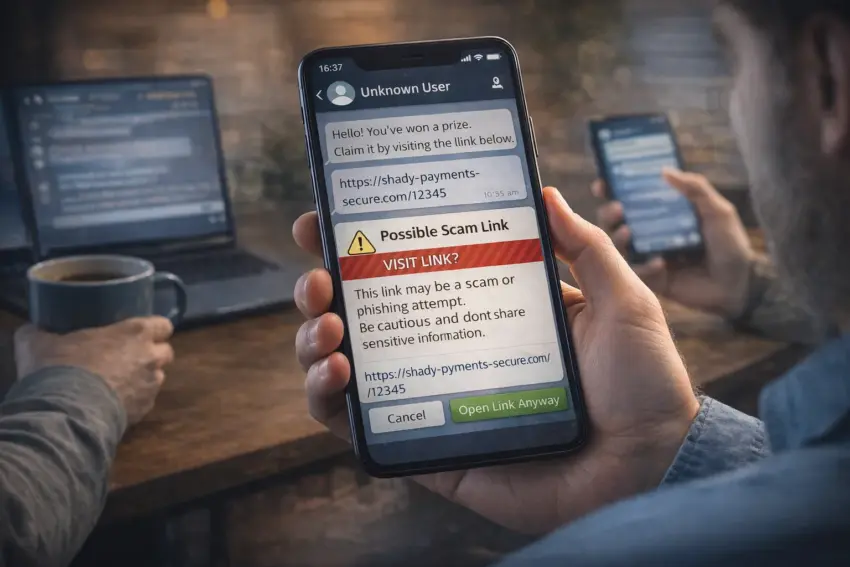
Messaging apps are adding built-in scam warnings for suspicious payment links, aiming to stop fraud before users leave the chat and enter a browser or payment page. The new prompts typically appear when a link looks risky—such as a newly created domain, a known phishing host, or a URL pattern commonly used in impersonation scams—and they encourage users to verify the request before sending money.
How in-app scam warnings work
Most systems combine automated detection with threat-intelligence feeds. When a message contains a payment-related link, the app can evaluate the domain reputation, check whether the URL matches known scam signatures, and look for manipulation patterns such as hidden redirects. If risk signals exceed a threshold, the user sees a warning before opening the link.
- Domain reputation checks to flag newly registered or previously reported sites.
- Phishing signature detection for common scam URL structures and redirect chains.
- Context cues when messages mimic delivery firms, banks, or marketplaces.
- On-click interstitials that insert a warning screen before the browser opens.
- Reporting shortcuts so users can flag scams and help improve detection.
Why payment-link scams are rising
Fraudsters increasingly use messaging apps because conversations feel personal and urgent. Common tactics include impersonating a friend who “needs help,” posing as a buyer or seller in second-hand marketplaces, or sending fake delivery fee requests. Payment links are effective because they shift the victim into a quick decision flow—often on mobile—where warning signs are easier to miss.
What users may see
Warnings are designed to be simple and actionable. Instead of technical details, the interface typically explains that the link may be unsafe and recommends verification steps. Some apps also highlight suspicious patterns, such as “this link is not from the official domain” or “this sender is unknown.”
- “Potential scam” banners attached to suspicious messages.
- Full-screen warnings when tapping a risky payment link.
- Advice prompts suggesting users confirm details via another channel.
- One-tap block/report options for suspected scam accounts.
- Safer alternatives such as using official apps or verified merchant links.
Challenges: false positives and encrypted contexts
Scam warnings must avoid overwhelming users with alerts. Too many false positives can lead people to ignore prompts, while overly strict filtering can interfere with legitimate peer-to-peer payments and small merchants. End-to-end encryption adds another complexity: some platforms limit automated scanning of message content, relying instead on on-device analysis, user reports, and link reputation checks that do not require reading full conversations.
What this means for users in Germany
In Germany, where payment and parcel scams frequently target mobile users, in-app warnings could reduce losses by interrupting the scam at the point of action. The biggest impact is likely for common scenarios: marketplace transactions, “delivery fee” links, and impersonation messages that push victims to act quickly. Clear warnings may also support digital literacy by teaching users what suspicious payment flows look like.
What to watch next
Expect messaging apps to expand beyond link warnings toward broader “transaction safety” features—such as verified merchant badges, safer payment handoffs to official apps, and stronger identity checks for accounts that send high volumes of payment requests. Fraudsters will adapt, so platforms will likely combine warnings with faster takedowns, better reporting feedback, and user education inside the app.
Bottom line
Built-in scam warnings for suspicious payment links are a practical attempt to stop fraud where it often succeeds: at the moment a user is about to click and pay. If platforms balance accuracy with usability, these prompts can reduce impulsive losses and make messaging-based payments safer—especially during high-pressure scam scenarios.